



FunnyPlaying GBA USB-C Battery Mod and Cover
Retro Gaming Parts
Regular price $68.00
GBA LI-ION 1800 mAh USB-C Rechargeable Battery & Battery Cover
Drop in GBA battery mod for both GBA screen variants!
Both these USB-C rechargeable battery packs do not need soldering.
- Upgrade your GBA easily to the Type-C rechargeable battery pack.
- The battery packs support charging and playing. Type-C to Type-C and Type-A to Type-C charging power supply is also supported.
- The mod has a battery charging and low battery LED indicator. (Charging = Blue, Charged = Green, Low Battery = Red)
This is the perfect solution for upgrading your Game Boy Advance alongside an IPS / IPS MAX screen upgrade.
Options:
- Buy the battery mod on its own,
- battery cover on its own or
- both items together.
Choose the correct battery pack for your shell.
- IPS Laminated screen and shells need the laminated battery mod
- IPS MAX screen and shells need the IPS Max battery mod. Install instructions here
What is included;
- 1x USB-C Module Board (for the IPS or IPS MAX screen)
- 1x 1800mAH Battery
- 1x Cooling Copper
- optional 1x USB-C Battery Cover(Choice of colours to match laminated GBA shells)
Whats not included;
- USB-C charging cable.
Notes;
For the GBA IPS Mod, be sure to remove left side battery springs, as shown in image.

For the GBA IPS MAX Mod this switch needs to be on for the battery to work. It can be turned off during periods of non use to save any battery drain.

1. The IPS board and battery is designed to fit perfectly into Laminated GBA shells. The IPS Max board is designed to fit perfectly into the IPS Max shells.
2. Risk of fire if you attempt to unsafely charge or use a battery that has been punctured/damaged. Never use a screwdriver or other metal tool to "lever" the battery in or out of the shell.
Customer Reviews
If you buy the GBA Laminated 3 inch IPS screen kit with the laminated-IPS-ready GBA shell, then this USB battery should definitely be on your shopping list. I assembled the 'NEW' Funnyplaying GBA screen kit and proceeded to use IKEA rechargeable AAs as before, but noticed that the battery warning light would come on almost straight away, especially with screen on bright. Perhaps the low-voltage threshold is reached quicker with the laminated mod. The USB battery seems to have solved this. Oh, and it fits like a glove in the IPS-ready shell. No cutting or trimming required.
For comparison, I have another GBA with an earlier non-laminated IPS screen running the IKEA rechargeables which doesn't suffer the same low voltage issue, and lasts for ages on the AAs.
Get a clear or frosted battery cover so you can see the charge status lights without taking off the battery cover. The PCB looks great - put it on show!
I'm not sure why the heatsink must be applied over the battery charge lights guide on the PCB. Was it an afterthought?
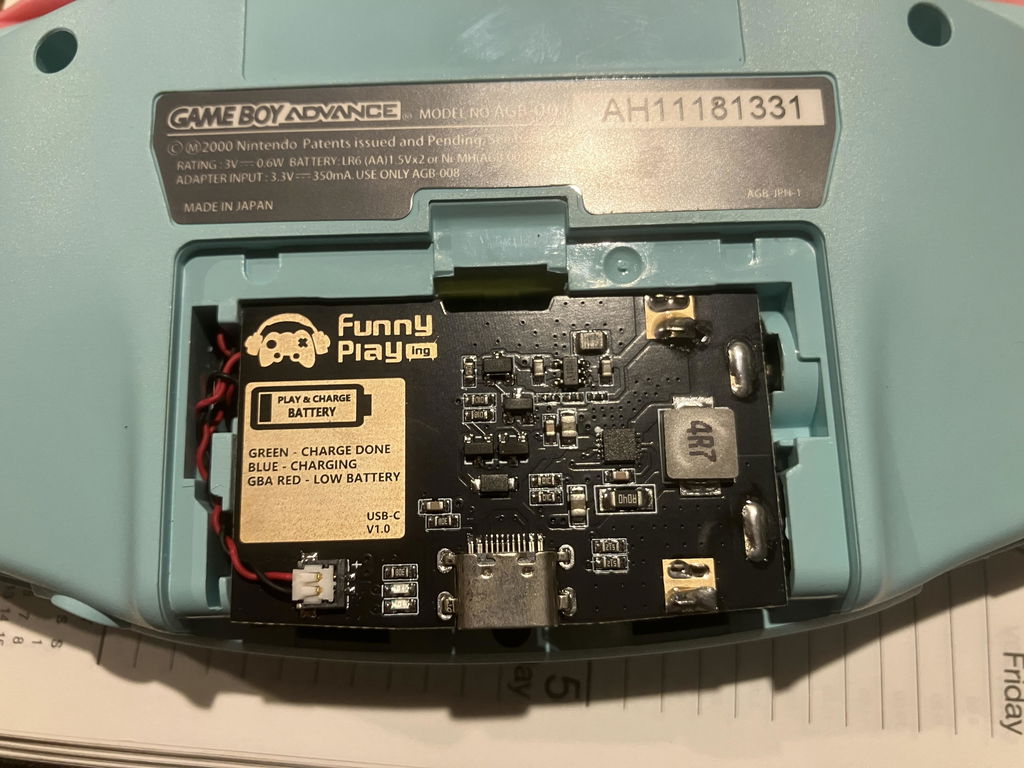
Love the USB C charging, it's just a bit of a shame there's no little hole in the front of the battery cover to see the charge. Only way to see if it's charging and what the charge is at is if you remove the battery cover. Other than that it's fantastic and does its job
$65 as of my purchase is a very cheap price given how expensive battery packs are nowadays and is an easy recommendation by me. Easy installation and works great, I bought a GBA IPS screen kit and purple laminated shell as well and with everything connected I feel the battery lasted all day. also doesn't take long to fully charge back up so you'll be gaming more.
Installation is pretty straightforward but I reckon it needs a little installation note like.
1) remove left side battery prongs from GBA shell.
2) install battery into GBA.
3) connect battery to USB-C module board.
4) remove cooling copper tape from bottom and install on USB-C module board.
5) put on back cover.
Working as intended so far, fits quite snug into battery compartment
Was a bit confused on how to install it for the first time but it's pretty straightforward